Cross
UI Object that displays one or several crosses. This object is typically used as an overlay for an image.
If no data source is specified, a single cross will be drawn in the center of the frame. If a data source is defined it will be used to set the center of one or several crosses. The positions must be between 0 and 1.
The different crosses can be given different colors by specifying a list of colors or a color table for the color attribute.
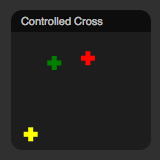
Example Cross Views
Example XML definition
  <object
    class="Cross"
    module="MY_MODULE"
    source="MY_OUTPUT"
    x="0"
    y="0"
  />
Attributes
| Attribute | Description | Default |
|---|---|---|
| class | must be "Cross" | |
| title | title of the object | module.source |
| x | placement of the object | |
| y | placement of the object | |
| w | width of the object | 1 |
| h | height of the object | 1 |
| module | name of the module to be visualized, if any | |
| source | name of the output to be visualized, if any | |
| color | color of the Cross(es) or list of colors | "yelow" |
| size | line length fron center of the Cross(es) in fraction of total view size (0.0-1.0) | 0.1 |
| stroke_width | stroke width in pixels | 3 |
Author
Christian Balkenius
Lund University Cognitive Science
christian.balkenius@lucs.lu.se
Files
Cross.js